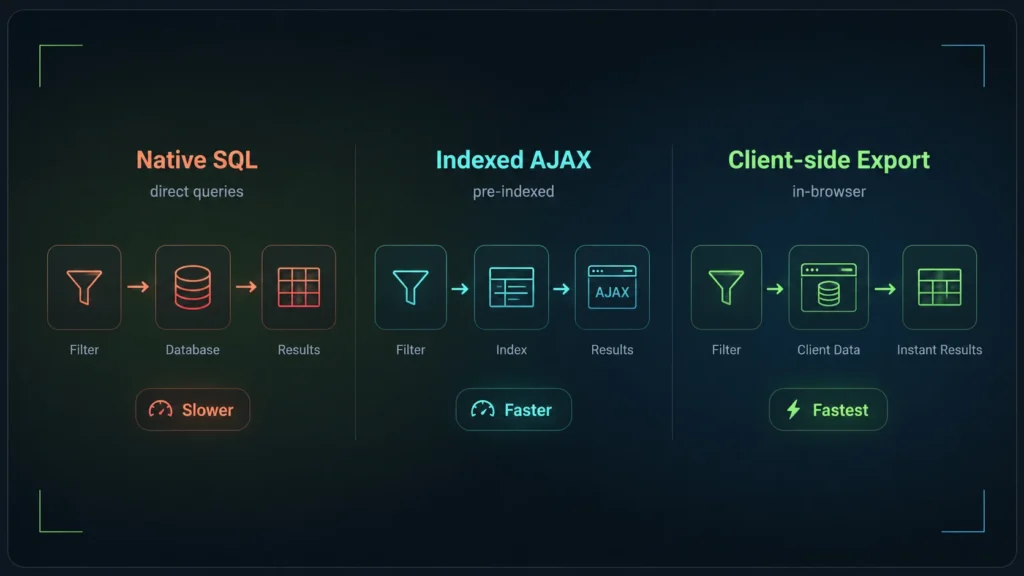
AJAX filters query your server and database every time a user clicks a filter, causing 1-3 second delays on large catalogs. Frontend-first filtering (JSON) downloads a lightweight index on the first page load, allowing the browser to filter thousands of products instantly (in under 5ms) without ever touching the server again. For catalogs over 2,000 products, frontend filtering is the only scalable architecture.
The evolution of WooCommerce filtering
If you have ever built a WooCommerce store that grew past a few thousand products, you know that filtering is usually the first thing to break. It starts with slow page loads, graduates to database timeouts during sales events, and ends with you researching caching layers and new plugins.
The root cause is almost always architectural. How a filter plugin queries your data and delivers the result to the browser dictates its performance ceiling. Over the last decade, WooCommerce filtering has evolved through three distinct generations of architecture:
- Generation 1: Standard WP_Query + AJAX (The baseline)
- Generation 2: Index-based AJAX (The FacetWP model)
- Generation 3: Frontend-first / Client-side (The InstantFilter model)
How to choose the best WooCommerce product filter plugin
When searching for a “WooCommerce product filter plugin”, most store owners compare features: Does it have color swatches? Can it filter by price slider? Does it support WooCommerce product add-ons?
While features matter, the underlying architecture is what determines if your site will crash during Black Friday. If you choose a plugin with a Generation 1 architecture, no amount of server caching will save you when traffic spikes. To make an informed decision, you need to understand how these three generations work under the hood.
Generation 1: Standard WP_Query & AJAX
This is how most free and entry-level filter plugins work. When a shopper clicks “Blue” and “Size M”, the plugin sends an AJAX request to the server. The server then constructs a massive WP_Query.
Because WooCommerce stores product data across multiple tables (wp_posts, wp_postmeta, wp_term_relationships), this query requires heavy JOIN operations. A single filter request might look like this under the hood:
SELECT SQL_CALC_FOUND_ROWS wp_posts.ID
FROM wp_posts
LEFT JOIN wp_term_relationships ON (wp_posts.ID = wp_term_relationships.object_id)
INNER JOIN wp_postmeta ON ( wp_posts.ID = wp_postmeta.post_id )
WHERE 1=1
AND wp_posts.post_type = 'product'
AND wp_posts.post_status = 'publish'
AND ( wp_postmeta.meta_key = '_price' AND CAST(wp_postmeta.meta_value AS SIGNED) < 50 )
GROUP BY wp_posts.ID
ORDER BY wp_posts.post_date DESC
The Good
- Real-time accuracy: Queries the live database, so stock changes reflect instantly.
- Easy to build: Uses native WordPress APIs.
The Bad
- Horrible scaling:
meta_queryandtax_queryJOINs become exponentially slower as the catalog grows. - High server load: Every click triggers a heavy database calculation.
Generation 2: Index-based AJAX
As catalogs grew, developers realized that querying the raw WordPress tables was unsustainable. This led to the second generation: Index-based filtering. Plugins like FacetWP pioneered this in the WordPress space.
Instead of querying wp_postmeta on the fly, these plugins require you to “Index” your products beforehand. They scan your catalog and build a flattened, optimized custom table (e.g., facetwp_index). This table maps every product ID directly to its facet values.
When a shopper clicks a filter, the plugin still sends an AJAX request to the server. However, the database query is now incredibly fast because it only has to query the optimized index table, not the sprawling native WooCommerce tables.
The bottleneck shifts: While the database query is now fast, the architecture still relies on AJAX. Every interaction requires a full round-trip: Browser → Network → PHP → Database → PHP → Network → Browser.
Even if the database query takes 5ms, network latency (TTFB + transfer time) often adds 200ms to 500ms to the interaction. The server still has to boot up WordPress for every click.
The AJAX Tax
If 100 shoppers are filtering simultaneously, an index-based AJAX plugin still forces your server to handle 100 concurrent PHP requests. The DB survives, but PHP workers can easily max out.
| Metric | Gen 1: Standard AJAX | Gen 2: Index AJAX |
|---|---|---|
| Database Query Time | Slow (Heavy JOINs) | Fast (Flat Table) |
| Server PHP Load | High | Medium |
| Network Latency | 200ms+ per click | 200ms+ per click |
Generation 3: Frontend-first (Hydrated)
If the database is no longer the bottleneck, the only way to get faster is to eliminate the network round-trip entirely. This is the Frontend-first or Client-side architecture, which powers InstantFilter.
Like Gen 2, InstantFilter indexes your catalog into custom tables (wp_if_*). But instead of waiting for AJAX requests, it takes an extra step: it compiles that index into a highly compressed JSON file called the Codebook.
The Hydration Phase
When a shopper lands on your category page, InstantFilter uses Server-Side Rendering (SSR) to output the HTML grid. This is crucial for SEO and first-paint speed.
However, in the background, the browser downloads the compressed JSON Codebook. Once downloaded, the page “hydrates”. The JavaScript engine takes over the filtering logic.
When the shopper clicks “Blue”, there is no AJAX request. The JavaScript filters the local JSON data and updates the DOM instantly. Interaction times drop from ~300ms (AJAX) to ~1.5ms – 5ms (Local JS).
Zero Server Load
Because filtering happens in the shopper’s browser, your server does absolutely nothing during the filter process. 100 concurrent shoppers filtering locally puts zero strain on your PHP workers.
Trade-offs: Which architecture wins?
There is no perfect architecture; there are only engineering trade-offs. Here is how to choose based on your project requirements:
Choose Frontend-first (InstantFilter) if:
- Speed is paramount: You want app-like, 0-latency interactions.
- High traffic: You need to protect your server from concurrent PHP requests during sales.
- WooCommerce focus: You are building a dedicated e-commerce experience.
Choose Index AJAX (FacetWP) if:
- Mixed content: You need to filter blog posts, directories, and custom post types alongside products.
- Massive datasets: If your catalog exceeds 100,000+ products, a JSON payload might become too large for mobile browsers to parse efficiently, making server-side AJAX a safer fallback.
- Complex add-ons: You heavily rely on dynamic pricing calculators or third-party WooCommerce product add-ons that must be calculated on the server per request.
Go deeper
Explore our other technical guides, blog posts, and comparisons:
- Where WooCommerce filters slow your site
- Filter 50K products without AJAX load
- Mobile filter latency and conversions
- Compare FacetWP, HUSKY, YITH and InstantFilter
- InstantFilter vs FacetWP