The best WooCommerce filter plugin isn’t the one with the most design options—it’s the one that doesn’t crash your database. While traditional plugins like FacetWP and YITH use AJAX to query your server on every click, modern stores use frontend-first JSON filtering (like InstantFilter) to achieve instant 0ms load times and zero server strain. Read on to see exactly how the top 4 plugins compare architecturally.
The filter paradox: UI vs Database
If you are searching for the best WooCommerce filter plugin, you are probably comparing sidebars, swatches, and price sliders. That is a trap. Almost every plugin can render a clean UI—the real difference is the architecture behind those checkboxes, and whether your shop scales to 50,000 SKUs or stalls during Black Friday.
Many store owners start with the best WooCommerce filter they find in a roundup, only to discover it was built for blogs and portfolios—not product catalogs. A dedicated best WooCommerce product filter must handle facet counts, variation attributes, and cache-friendly URLs. When you evaluate a best WooCommerce product filter plugin, ignore the demo skin and ask how it queries (or exports) your catalog on every click.
Product filtering is fundamentally a search problem. When a customer selects “Blue”, “Size L”, and “In Stock”, the server must intersect those conditions against thousands of products, calculate the remaining available counts for all other filters (facet counts), and return the correct product grid. Doing this efficiently requires specialized database structures or caching strategies.
Most shops start with a free plugin, hit a performance wall around 2,000 products, upgrade their hosting, and eventually realize the bottleneck is the filter’s SQL query, not the server’s CPU. To break this cycle, you need to understand the three dominant architectures in the WordPress ecosystem.
How to choose the best WooCommerce filter plugin
There is no universal winner—the best WooCommerce filter plugin for your store depends on four criteria you can evaluate before installing anything:
- Catalog size: Under ~2,000 SKUs, native SQL filters may suffice. Above 5,000, you need an index table or a frontend export—or filtering will dominate your server load.
- Architecture: AJAX plugins (FacetWP, YITH, HUSKY) query the server on every click. Frontend-first plugins (InstantFilter) shift filtering to the browser after the first page load.
- Variable products: If you sell apparel or furniture, you need a best WooCommerce product filter that can show variations as separate cards—not just filter the parent product with the wrong image.
- Scope & budget: General WordPress filters excel at mixed post types. WooCommerce-native tools trade breadth for product-specific performance and variation UX.
Use the matrix and deep dives below to map FacetWP, YITH, HUSKY, and InstantFilter against these criteria—without relying on sponsored “top 10” lists.
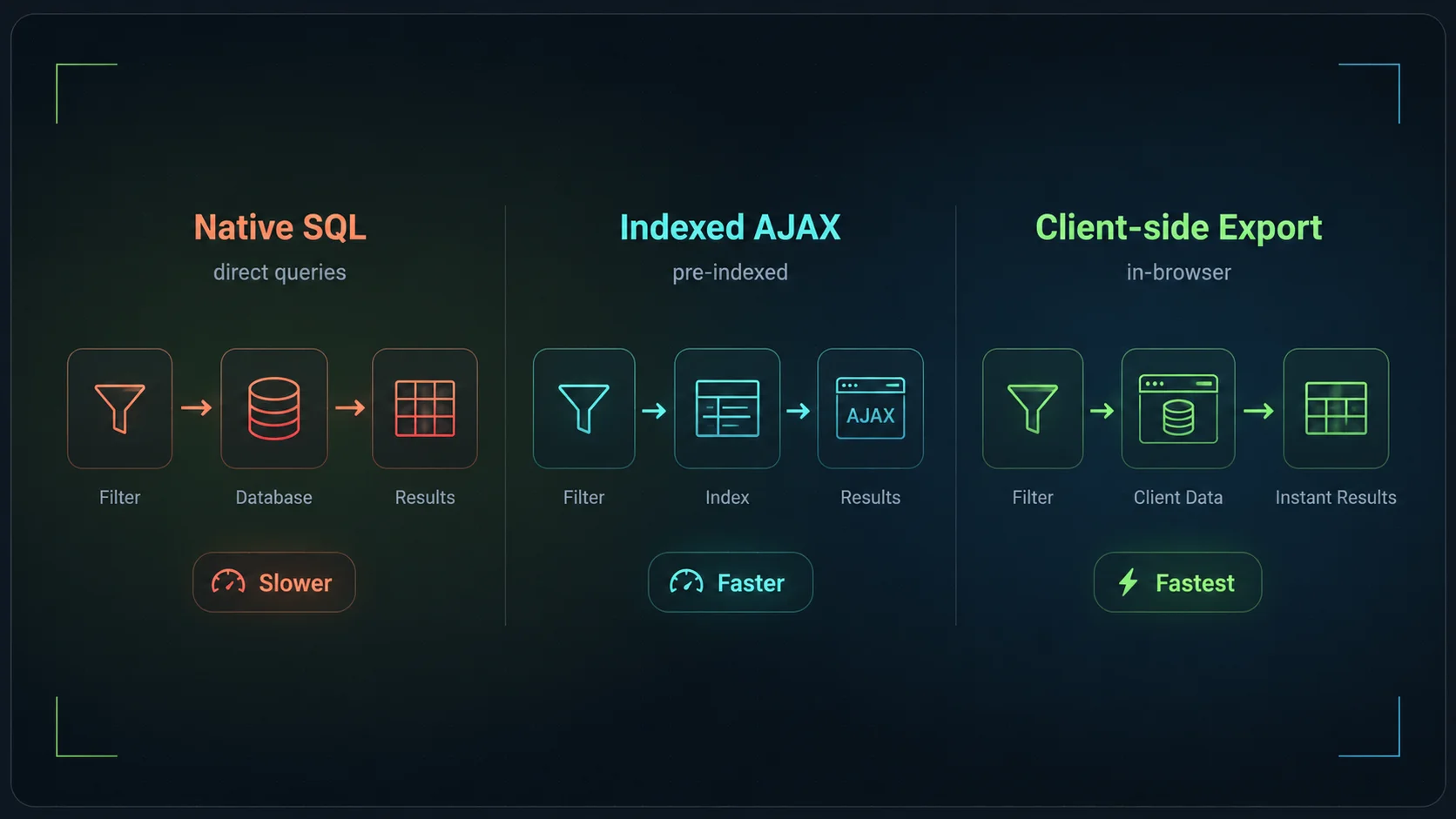
The 3 filter architectures
1. Native SQL (The Default)
Plugins in this category translate every filter click into a complex WordPress WP_Query with multiple meta_query and tax_query clauses. Because WooCommerce stores product attributes in a fragmented way across wp_postmeta and wp_term_relationships, these queries require massive SQL JOIN operations.
The result: It works fine for 500 products. At 5,000 products, the database struggles. Cache plugins cannot help, because every combination of filters creates a unique URL that bypasses the page cache.
2. Indexed AJAX (The Standard)
To solve the SQL nightmare, premium plugins like FacetWP introduce an index table. They scan your catalog in the background and build a flattened, highly optimized database table (e.g., facetwp_index). When a user filters, the plugin queries this fast table instead of the core WordPress tables.
The result: Queries are much faster. However, every single filter click still requires an AJAX round-trip to the server. If 100 users are filtering simultaneously, your server must process 100 PHP requests per second, which can quickly exhaust PHP workers.
3. Client-side Export (The Modern Approach)
This architecture, used by InstantFilter, takes indexing a step further. Instead of keeping the index in the database and querying it via AJAX, the index is compressed into a static JSON file (the “codebook”) and sent to the browser alongside the initial page load.
The result: The first page load is fully server-rendered (SSR) for SEO and caching. Once the JavaScript hydrates, all subsequent filter clicks, facet count updates, and pagination happen entirely in the browser. Zero AJAX requests, zero PHP worker load during interaction.
Why architecture matters
- TTFB: Time To First Byte dictates how fast the grid updates.
- Concurrency: How many users can filter at the exact same second?
- Hosting costs: AJAX-heavy sites require expensive CPU/RAM upgrades.
Feature & Architecture Matrix
This matrix compares the fundamental capabilities of the most common WooCommerce product filter solutions. We focus on structural differences rather than UI tweaks (like color swatch shapes), as UI can usually be customized with CSS.
| Capability | InstantFilter | FacetWP | YITH / HUSKY |
|---|---|---|---|
| Primary focus | WooCommerce only | Any WP post type | WooCommerce |
| Architecture | Client-side Export | Indexed AJAX | Native SQL / AJAX |
| Server load per click | Zero (Browser math) | Medium (Fast DB query) | High (Complex DB query) |
| Page cache compatibility | Excellent (SSR first paint) | Poor (AJAX bypasses cache) | Poor (AJAX bypasses cache) |
| Variation Explode Show child variations as separate cards | ✓ Native (Inherit or Strict) | ✗ Parent-only (requires add-ons) | ✗ Limited / Hacky |
| Proximity Search Filter by geolocation / radius | ✗ No | ✓ Yes | ✗ No |
| Entry Price (Annual) | €129 (Founders) | $99 (3 sites) | Free / ~$80 Pro |
Deep dive: FacetWP (The Generalist)
FacetWP is arguably the most respected premium filter plugin in the WordPress ecosystem. Its strength lies in its versatility: it is not just a WooCommerce plugin. It can filter blog posts, custom post types, ACF fields, and WP Job Manager listings with equal ease.
It achieves this by hooking into the main WordPress query and using its own facetwp_index table. When you save a post or product, FacetWP extracts the relevant data and stores it in a flattened format. This makes its AJAX queries significantly faster than native WooCommerce filtering.
Where FacetWP shines
- Complex, multi-post-type sites: If you run a directory site that also sells merchandise, FacetWP handles both seamlessly.
- Proximity search: Excellent built-in support for filtering by distance (e.g., “Stores within 50 miles”).
- Developer ecosystem: A massive library of hooks, filters, and third-party add-ons.
Where FacetWP struggles
- WooCommerce Variations: It filters variable products by looking at the parent product. If you want to show the “Red” variation as a distinct product card in the grid, you need complex custom code or third-party add-ons.
- High-concurrency sales: Because every click is an AJAX request, a sudden spike in traffic (like a Black Friday email blast) can overwhelm PHP workers, even with the optimized index table.
Deep dive: YITH & HUSKY (The AJAX Defaults)
Plugins like YITH Ajax Product Filter and HUSKY (formerly WOOF) represent the traditional approach to WooCommerce filtering. They are incredibly popular, largely due to their freemium models and visibility on the WordPress.org repository.
These plugins typically rely on native WordPress queries, intercepted and executed via AJAX. They often add their own caching layers (like storing transient queries) to mitigate the performance hit, but they are fundamentally bound by the WordPress database schema.
Where they shine
- Budget constraints: The free versions are sufficient for small shops with simple needs.
- Ecosystem lock-in: If you already use 10 other YITH plugins, adding their filter plugin ensures UI consistency and guaranteed compatibility.
- Ease of setup: Very little configuration required for basic attribute filtering.
Where they struggle
- Performance at scale: Once a catalog exceeds a few thousand SKUs, the complex SQL joins required to calculate dynamic facet counts become a severe bottleneck.
- SEO and Caching: AJAX-heavy implementations often conflict with full-page caching solutions like WP Rocket, requiring you to exclude shop pages from the cache entirely.
Deep dive: InstantFilter (The Performance Specialist)
InstantFilter was built with a singular, opinionated focus: WooCommerce performance at scale. It abandons the AJAX model entirely in favor of a client-side export architecture.
During the background indexing process, InstantFilter compiles your catalog’s filter data into a highly compressed JSON “codebook”. When a shopper visits a category page, the server renders the initial HTML grid (perfect for SEO and TTFB), and the browser downloads the codebook in the background. From that moment on, every filter click, facet count recalculation, and pagination event is handled instantly by the browser’s JavaScript engine.
Native Variation Explode
Because InstantFilter indexes data specifically for WooCommerce, it understands the difference between a parent product and a variation. It offers native “Explode” modes.
Instead of showing one generic t-shirt card when a user filters by “Red”, InstantFilter can “explode” the variable product and show the specific Red variation card, complete with the correct image, price, and SKU. This is a critical merchandising feature for apparel and furniture stores, built directly into the core engine without requiring add-ons.
Explode Modes
- Off: Standard parent cards.
- Inherit: Show variation cards, but fallback to parent data if missing.
- Strict: Only show variations with explicitly defined data.
Where InstantFilter shines
- High-traffic WooCommerce stores: Zero AJAX means zero PHP worker exhaustion during filter interactions. Your server only handles the initial page load.
- Instant UX: Because the math happens in the browser, filter updates take milliseconds, regardless of server load or geographic latency.
- Apparel & complex catalogs: Native variation explode makes merchandising variable products vastly superior.
Where InstantFilter struggles
- Non-WooCommerce sites: It cannot filter blog posts, recipes, or custom post types. It is strictly for WooCommerce products.
- Massive catalogs on low-end mobile: While the JSON export is heavily compressed, a 100,000 SKU catalog still requires the browser to download and parse a payload. On very old mobile devices, this initial hydration can take a second longer than an AJAX approach (though subsequent clicks will be faster).
Keep exploring
Choosing the right architecture depends entirely on your catalog size, traffic patterns, and merchandising needs. Dive deeper into specific comparisons and performance metrics:
- InstantFilter vs FacetWP
- InstantFilter vs YITH Ajax Filter
- InstantFilter vs HUSKY (WOOF)
- InstantFilter vs Filter Everything
- InstantFilter vs JetSmartFilters
- Why filters slow down WooCommerce
Common questions about filter plugins
Test the client-side difference
Clone your production site to staging, install InstantFilter, and watch your server metrics drop during filter interactions.