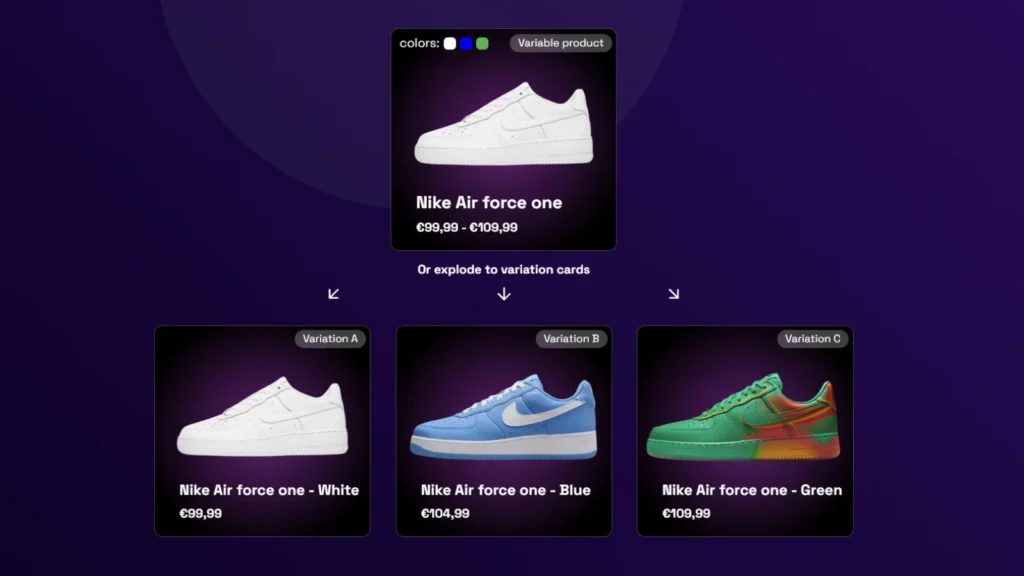
To show variations as single products in WooCommerce (e.g., showing all 4 colors of a t-shirt as separate cards), you need a filter plugin that indexes variations individually. While native WooCommerce only shows parent products, InstantFilter’s “Variation Explode” mode automatically splits variable products into individual cards on the shop page, ensuring the image always matches the selected color filter.
The Fashion & Furniture UX Problem
If you are looking for how to show variations as single products in WooCommerce, you are solving one of the most common UX failures in apparel, furniture, and cosmetics stores. A single t-shirt might come in 4 colors and 5 sizes—20 variations hidden behind one parent card while shoppers expect each color visible on the shop page.
Store owners often try to show variations as single products in the category grid, but native WooCommerce keeps everything grouped under the parent. When filters and images do not match, conversion drops. This guide explains how to show variations on the shop page in WooCommerce without a stack of brittle add-ons—and how to show variations for WooCommerce catalogs at scale.
This creates a massive UX problem on the category page.
Natively, WooCommerce only displays the parent product in the shop grid. If a shopper uses a filter sidebar to select the color “Red”, WooCommerce finds the parent product that contains a red variation and displays it.
But here is the catch: the parent product usually displays its default featured image (e.g., the Blue version). The shopper clicks “Red”, the page reloads, and they are staring at a grid full of Blue, Black, and Grey products. They immediately assume your filters are broken and leave.
To fix this, you need to show the exact variation the user filtered for, or better yet, display every color as its own separate card in the grid from the start.
The “Broken Filter” Illusion
When shoppers filter for a specific attribute but see a product image that doesn’t match their selection, conversion rates drop significantly. Visual confirmation is critical in e-commerce.
The Traditional Fix: Add-on Hell
Because WooCommerce doesn’t support showing variations as single products out of the box, store owners usually turn to third-party plugins (like Iconic’s Show Single Variations). While these plugins work, they introduce a new set of architectural problems when combined with a filter plugin.
The Native Indexing Approach
- Zero DB Manipulation: Keep your WooCommerce database clean. No fake posts, no hidden meta.
- Indexer-level Logic: The filter plugin itself understands variations and indexes them as separate entities in its own optimized tables.
- Single Source of Truth: One plugin handles both the display logic and the filtering logic, ensuring they never fall out of sync.
The Add-on Approach
- Database Bloat: The variation plugin often creates duplicate hidden posts or complex meta-data to trick WooCommerce into displaying variations in the loop.
- Sync Issues: Your filter plugin (e.g., FacetWP) now has to index this manipulated data. If the variation plugin updates, the filter index often breaks.
- Performance Hit: You are now running heavy AJAX filter queries on top of a manipulated WooCommerce loop.
How to show variations as single products in WooCommerce
If you want to show variations as single products in WooCommerce, you generally have two paths to choose from:
- The Database Method (Third-party plugins): You install a plugin like WooCommerce Show Single Variations. This plugin alters how WooCommerce queries the database, forcing it to inject variation IDs into the main shop loop. You then need to ensure your filter plugin (like FacetWP or YITH) is compatible with this manipulated loop.
- The Indexer Method (InstantFilter): You use a filter plugin that natively understands variations at the index level. Your WooCommerce database remains untouched. The filter plugin simply reads the variations and generates a frontend grid where each variation is treated as a separate card.
We built InstantFilter around the second method because it is significantly faster and less prone to breaking when WooCommerce updates.
The InstantFilter Approach: Variation Explode
InstantFilter was built specifically for WooCommerce, which means variable products are treated as first-class citizens. Instead of relying on third-party add-ons, InstantFilter handles variation logic during the Indexing Phase.
When InstantFilter scans your catalog, you can instruct it to “explode” variable products. It reads the parent product, extracts the variations, and indexes them as if they were standalone products in the JSON Codebook. Your actual WooCommerce database remains completely untouched.
We offer three distinct Explode Modes to match your merchandising strategy:
| Mode | How it works | Best used for |
|---|---|---|
parent (Default) | Indexes only the parent product. Variations are searchable, but only the parent card is shown. | Electronics, hardware, or catalogs where variations don’t change the visual appearance. |
explode_unique | Explodes variations into separate cards only if they have a unique image assigned in WooCommerce. | Fashion and apparel. Shows different colors as separate cards, but groups sizes together. |
explode_inherit | Explodes every single variation into its own card, falling back to the parent image if necessary. | B2B catalogs, spare parts, or stores where every SKU needs to be visible in the grid. |
See it in action
Here is a practical example. We have one parent product (a t-shirt) with three color variations. Notice how the explode_unique mode transforms the shopping experience by giving each color its own entry point in the grid:
When a shopper clicks the “Blue” card, they are taken directly to the product page with the Blue variation pre-selected. This removes friction and shortens the path to purchase.
The Performance Impact of Exploding
There is a reason many AJAX-based filter plugins struggle with exploding variations: scale.
If you have a catalog of 5,000 products, and each product comes in 4 colors, exploding them means your shop grid now contains 20,000 cards. If you are using a Generation 1 or Generation 2 AJAX filter, querying a 20,000-item database on every click will cause noticeable server strain and latency.
Because InstantFilter uses a Frontend-first JSON architecture, exploding variations has zero impact on your server during filtering. The 20,000 cards are compiled into a highly compressed JSON Codebook. The browser downloads this file once, and all filtering happens locally in milliseconds.
Go deeper
Explore our other technical guides and comparisons:
- AJAX vs index-based vs frontend-first filtering
- InstantFilter vs FacetWP
- Where WooCommerce filters slow your site